
New in Moodle 2026/27
Easier content import
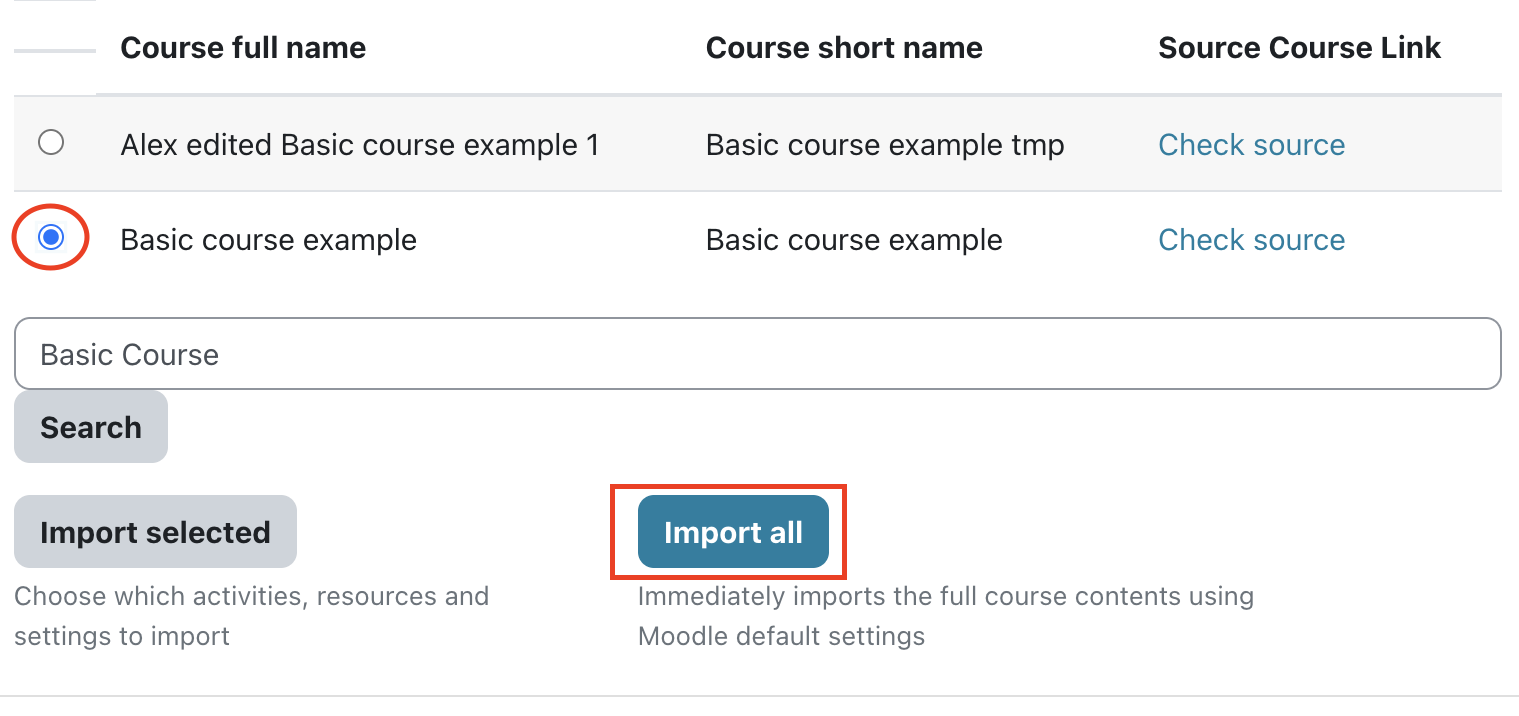
Moodle now suggests the most relevant previous course and offers a faster “Import all” workflow.
Course summaries can new also be copied from the target course if one exists.
The most recent previous course is now selected by default.
How to use:
- Open the new course.
- Click Import contents from a previous course at the top
- Confirm or change the suggested source course.
- Choose whether to copy the course summary text.
- Continue with "Import all" or the detailed "Import selected" workflow.
Assignment and quiz reminder controls
Teachers can enable or disable:
- assignment due-soon notifications, sent approximately 48 hours before the effective due date;
- quiz opening-soon notifications, sent approximately 48 hours before the opening date.
How to use:
- Open the assignment or quiz.
- Find Due-soon notification (notifications > show more may be necessary) or Opening-soon notification (under timing) in the activity information.
- Select Enabled or Disabled.
The setting is preserved when activities are duplicated, imported or restored. Legacy noduesoon markers remain supported as a fallback.
Course creation improvements
The Dashboard now allows course-creation for instructors directly if the course is listed in TimeEdit but has not yet been created.
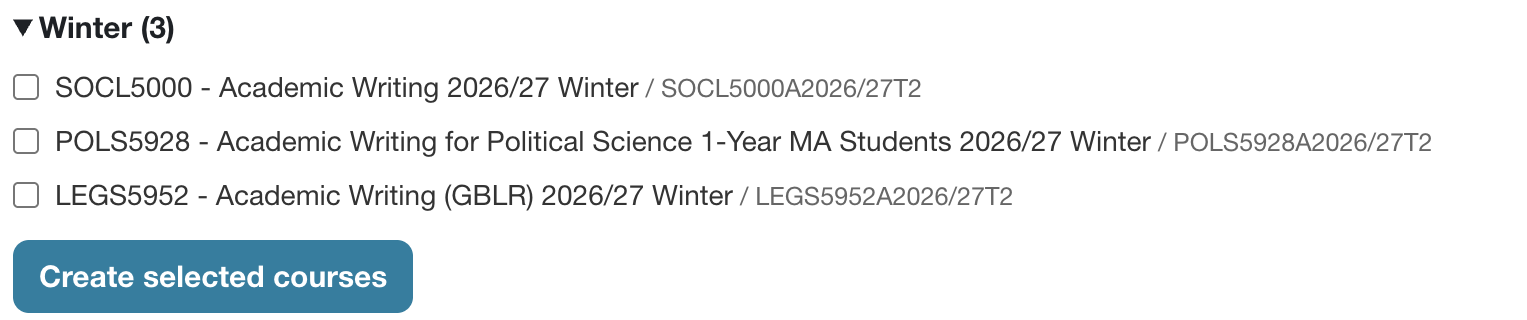
Teachers and coordinators see clearer indicators when courses are available for creation.
Improved course summary and category summary privacy controls
Course summary files and and text now have a separate setting which allows to restrict visibility to logged-in users if this is necessary in line with the new Web Policy (Section 5.3 specifically mentions student-facing files: https://documents.ceu.edu/documents/p-2511-1v2608)
These restrictions are enforced even when somebody knows the direct file URL.
Files attached to CEU category descriptions can also be restricted to require login. If/when you would like to make the files at a category summary restricted to login only, just edit the category and apply CEU to the category ID number.
Improved TinyMCE editor
Our Moodle use the core Atto editor by default, but as Moodle will stop supporting Atto, we will need to switch to TinyMCE next year. To make the transition less painful, we have prepared and improved the TinyMCE editor, and users can switch to TinyMCE at any time, if they want to try it out earlier or in case any issues with Atto.
This can be done directly at your profile -> preferences -> editor: https://ceulearning.ceu.edu/user/editor.php
Microsoft login routing improvements
Existing CEU accounts are routed more reliably to Microsoft authentication. Pending invitations, legacy LDAP-linked accounts and multiple identity-provider configurations are handled more safely.
Guest access improvements
Guest access now has a mandatory expiry date and two permission levels.
How to configure it:
- Open the course and select Access control at the right administration menu (the blocks area might need to be opened first).
- Enable guest access and optionally change the offered guest key.
- Set the Guest access end date.
- Select Standard Guest or Enhanced Guest.
- Save the settings.
Standard Guest is the privacy-preserving default. Guests can view permitted files and text but cannot access activities that may expose student information and the Participants menu.
Enhanced Guest provides broader activity access and may expose student names, forum posts, wiki contributions or other submitted work. It therefore requires a guest key and displays a privacy warning.
Access without a key defaults to 1 month, while key-protected access defaults to 12 months. Moodle does not warn teachers before expiry by default, but this may be changed in case this is necessary.
Existing old guest access courses was closed / will be closed after 24 months of creation.
In addition to prevent accidental access to new students of old courses where self-enrolment is enabled, these are closed as well, 24 months if no key was set, and 36 months with a key.
Protected Exam mode
What The Module Does